# Sahkan Akaun Bizappay (OTP)

Untuk memulakan penerimaan dan pengurusan pembayaran menggunakan Bizappay, anda perlu mengesahkan akaun Bizappay anda terlebih dahulu. Ini adalah standard KYC (*Know Your Customer*) yang digariskan oleh Bank Negara.

Untuk mengesahkan akaun Bizappay, ikuti langkah-langkah berikut:

<div><figure><img src="https://741636016-files.gitbook.io/~/files/v0/b/gitbook-x-prod.appspot.com/o/spaces%2FDDhNdk6F3s0N9Gq7wytI%2Fuploads%2Fe6KmUXy9gfcoBIfmoVQ3%2FSah%20OTP.001.png?alt=media&#x26;token=6d14132f-a69d-4cf2-9e68-2314be92f537" alt=""><figcaption></figcaption></figure> <figure><img src="https://741636016-files.gitbook.io/~/files/v0/b/gitbook-x-prod.appspot.com/o/spaces%2FDDhNdk6F3s0N9Gq7wytI%2Fuploads%2FiJS1U6iM5NaOqwg1SiTl%2FSah%20OTP.002.png?alt=media&#x26;token=953bf651-fc0d-4881-82d3-f687c01cd418" alt=""><figcaption></figcaption></figure></div>

1. Tekan ikon Bizappay di atas kanan Dashboard
2. Tekan Menu Bizappay (Pastikan anda telah mematikan Pop-Up Blocker)

<figure><img src="https://741636016-files.gitbook.io/~/files/v0/b/gitbook-x-prod.appspot.com/o/spaces%2FDDhNdk6F3s0N9Gq7wytI%2Fuploads%2FFJLjm0S1M9SGiOMC7Axf%2FSah%20OTP.003.png?alt=media&#x26;token=52f091e1-f736-4a41-aecb-3e7d26c00b83" alt=""><figcaption></figcaption></figure>

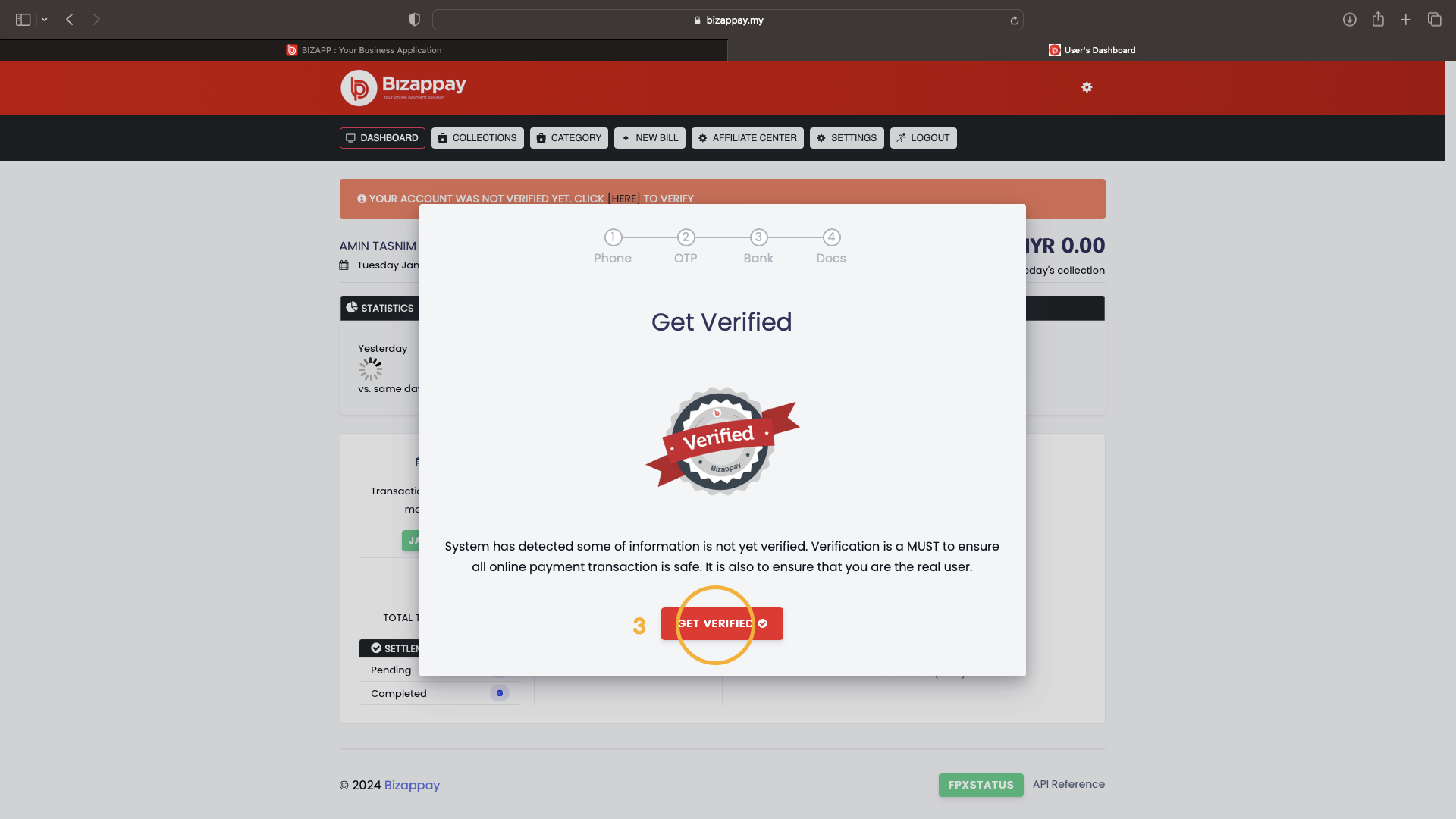
3. Tekan butang GET VERIFIED

<div><figure><img src="https://741636016-files.gitbook.io/~/files/v0/b/gitbook-x-prod.appspot.com/o/spaces%2FDDhNdk6F3s0N9Gq7wytI%2Fuploads%2FQjcBGyOdePHodDNZSTKn%2FSah%20OTP.004.png?alt=media&#x26;token=3ab0e1a4-0f8c-4d3c-9d25-068784878de7" alt=""><figcaption></figcaption></figure> <figure><img src="https://741636016-files.gitbook.io/~/files/v0/b/gitbook-x-prod.appspot.com/o/spaces%2FDDhNdk6F3s0N9Gq7wytI%2Fuploads%2F3TME7OcgsSGtW0fBcA4x%2FSah%20OTP.005.png?alt=media&#x26;token=7380905c-ec23-40a4-8ae1-4bb55e0bc3b5" alt=""><figcaption></figcaption></figure></div>

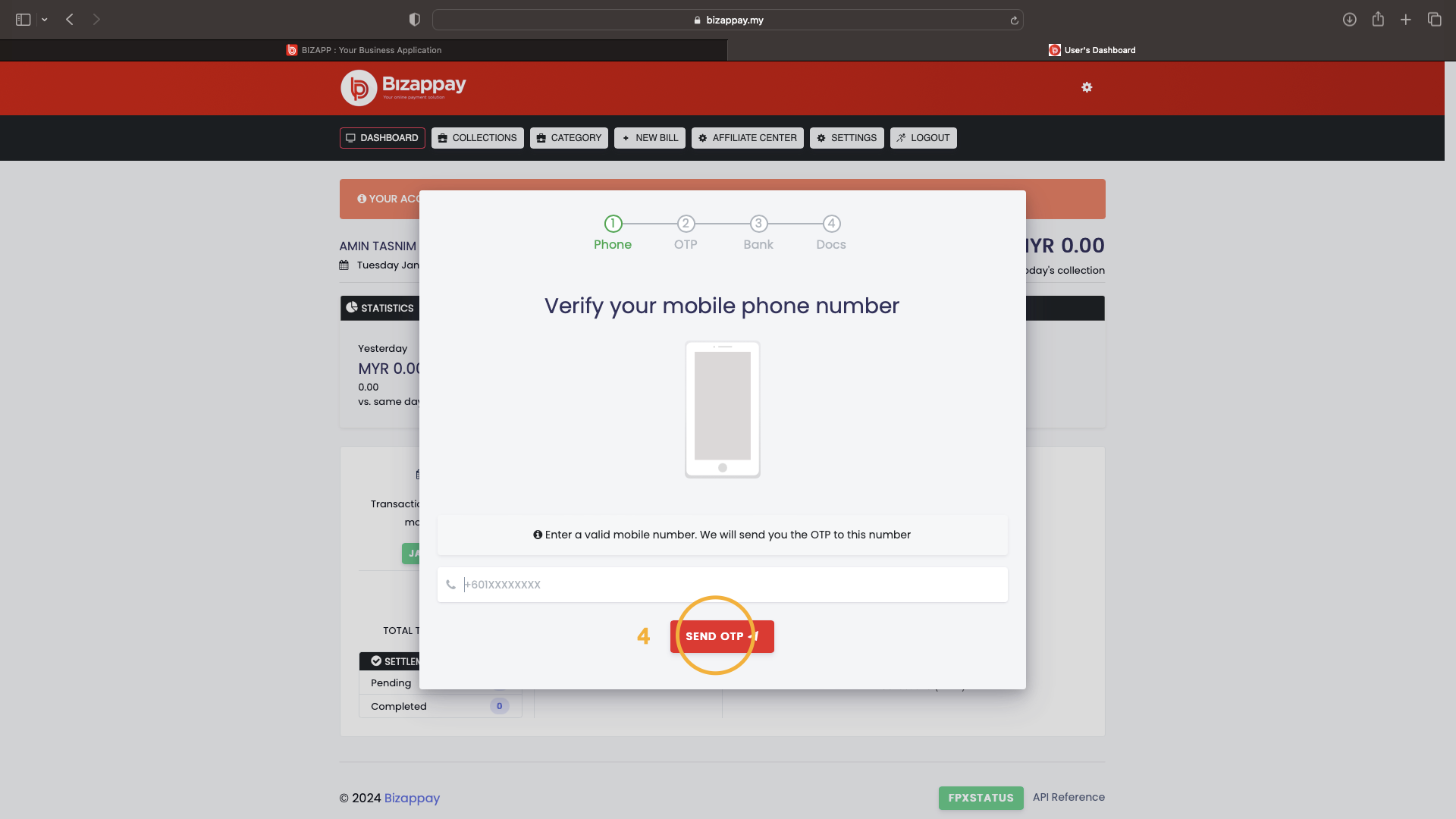
4. Masukkan nombor telefon aktif dan tekan butang SEND OTP
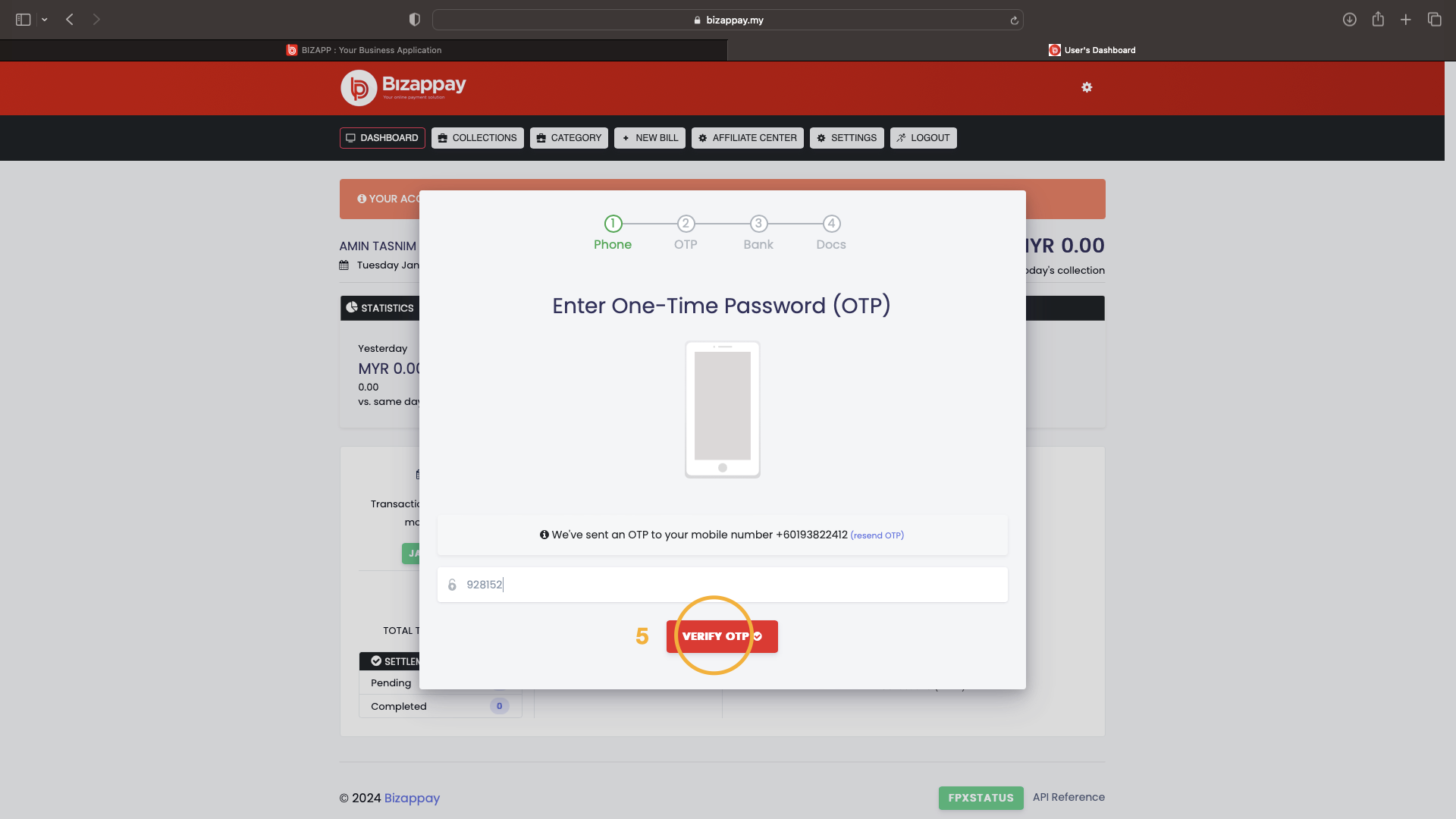
5. Masukkan OTP enam (6) nombor dan tekan butang VERIFY OTP

<div><figure><img src="https://741636016-files.gitbook.io/~/files/v0/b/gitbook-x-prod.appspot.com/o/spaces%2FDDhNdk6F3s0N9Gq7wytI%2Fuploads%2FSY5liRMGf6biCO1iC2S2%2FJenis.001.png?alt=media&#x26;token=635cad91-34a1-44ed-8ead-8f760e9f5c15" alt=""><figcaption></figcaption></figure> <figure><img src="https://741636016-files.gitbook.io/~/files/v0/b/gitbook-x-prod.appspot.com/o/spaces%2FDDhNdk6F3s0N9Gq7wytI%2Fuploads%2FWmqzhByrD4sqm66bs7gT%2FJenis.002.png?alt=media&#x26;token=05767a91-a72e-4b2d-a7da-6902b0de6523" alt=""><figcaption></figcaption></figure></div>

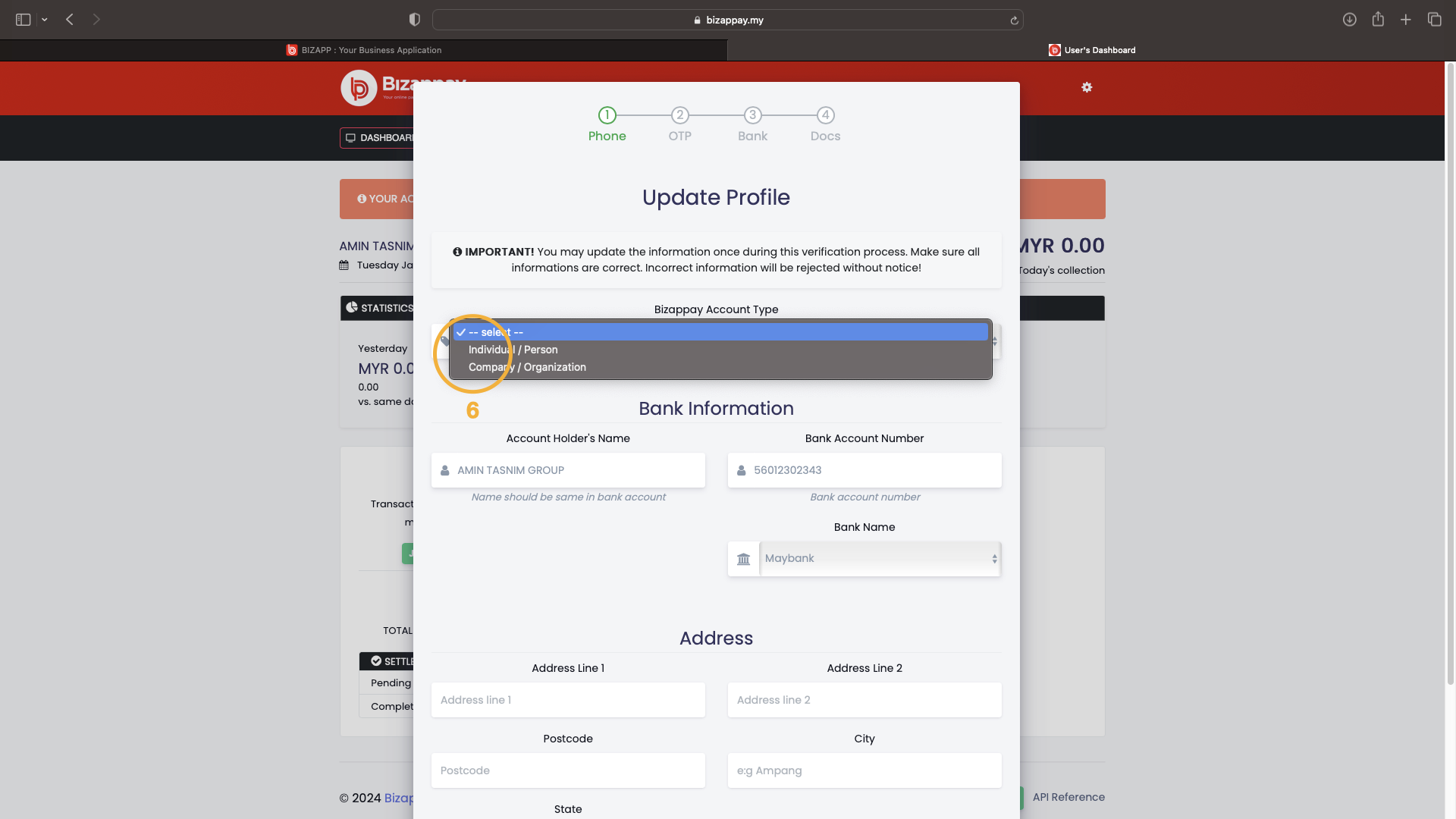
6. Pilih jenis akaun. Pilih INDIVIDUAL/PERSON bagi perniagaan tidak berdaftar atau COMPANY/ORGANISATION bagi perniagaan atau persatuan berdaftar.&#x20;
7. Lengkapkan maklumat yang diminta

<div><figure><img src="https://741636016-files.gitbook.io/~/files/v0/b/gitbook-x-prod.appspot.com/o/spaces%2FDDhNdk6F3s0N9Gq7wytI%2Fuploads%2Fp8Y6sbp3H52TSBGoYT81%2FBizappay%20-%20sahkan%20(otp).008.png?alt=media&#x26;token=178cb998-997a-4293-bf66-b9c4fbbd88bb" alt=""><figcaption></figcaption></figure> <figure><img src="https://741636016-files.gitbook.io/~/files/v0/b/gitbook-x-prod.appspot.com/o/spaces%2FDDhNdk6F3s0N9Gq7wytI%2Fuploads%2FPakTaP3G3dwJGSHurK4I%2FBizappay%20-%20sahkan%20(otp).009.png?alt=media&#x26;token=233c58d5-aa28-4437-8bde-706348e62a79" alt=""><figcaption></figcaption></figure></div>

8. Masukkan lampiran dokumen yang diminta mengikut contoh yang ditunjukkan\
   AKAUN JENIS INDIVIDUAL/PERSON\
   \- Salinan Kad Pengenalan depan dan belakang\
   \- Penyata akaun bank yang terlihat Nama Bank, Nombor Akaun, Penama Akaun\
   \
   AKAUN JENIS COMPANY/ORGANISATION\
   \- Salinan SSM\
   \- Penyata akaun bank yang terlihat Nama Bank, Nombor Akaun, Penama Akaun
9. Tekan butang Finish

<div><figure><img src="https://741636016-files.gitbook.io/~/files/v0/b/gitbook-x-prod.appspot.com/o/spaces%2FDDhNdk6F3s0N9Gq7wytI%2Fuploads%2FV143UWwOa3yH5GxvIvgA%2FBizappay%20-%20sahkan%20(otp).010.png?alt=media&#x26;token=d04ab4a6-88c5-4683-8938-a3a488945b12" alt=""><figcaption></figcaption></figure> <figure><img src="https://741636016-files.gitbook.io/~/files/v0/b/gitbook-x-prod.appspot.com/o/spaces%2FDDhNdk6F3s0N9Gq7wytI%2Fuploads%2F4k9eolEk2Vlh3lTzwAFh%2FBizappay%20-%20sahkan%20(otp).011.png?alt=media&#x26;token=e6be11ff-03bf-4c82-9ed3-321825dfdb6e" alt=""><figcaption></figcaption></figure></div>

10. Bar menunjukkan akaun anda sedang diproses akan kelihatan di Dashboard utama Bizappay. Pengesahan akaun mengambil masa 3-5 hari bekerja. Jika akaun anda tidak disahakan dalam tempoh berkenaan, hubungi kami untuk tujuan pengesahan
11. Apabila akaun anda telah disahkan, bar biru akan hilang dan anda boleh lihat status VERIFIED dengan menekan bahagian SETTING
12. Stamp Verified dapat dilihat disini


---

# Agent Instructions: Querying This Documentation

If you need additional information that is not directly available in this page, you can query the documentation dynamically by asking a question.

Perform an HTTP GET request on the current page URL with the `ask` query parameter:

```
GET https://bizapp.gitbook.io/tutorial/selamat-datang-hq-founder/panduan-asas-mula/bizappay-pembayaran-online/sahkan-akaun-bizappay-otp.md?ask=<question>
```

The question should be specific, self-contained, and written in natural language.
The response will contain a direct answer to the question and relevant excerpts and sources from the documentation.

Use this mechanism when the answer is not explicitly present in the current page, you need clarification or additional context, or you want to retrieve related documentation sections.