> For the complete documentation index, see [llms.txt](https://bizapp.gitbook.io/tutorial/llms.txt). Markdown versions of documentation pages are available by appending `.md` to page URLs; this page is available as [Markdown](https://bizapp.gitbook.io/tutorial/selamat-datang-hq-founder/modul-kurier/integrasi-kurier/integrasi-abx.md).

# Integrasi ABX

Jika anda belum mempunyai akaun bersama ABX, hubungi WhatsApp mereka di [sini](https://wa.me/60177450852?text=daftarABX4BIZAPP). Nyatakan maklumat seperti berikut:

* Nama atau nama syarikat
* Nombor telefon yang boleh dihubungi
* Alamat semasa&#x20;

Wakil ABX akan menghubungi anda dan berikan maklumat yang anda perlukan. Untuk menyambung akaun ABX anda dengan BIZAPP,  ikuti langkah-langkah berikut:

<div><figure><img src="https://741636016-files.gitbook.io/~/files/v0/b/gitbook-x-prod.appspot.com/o/spaces%2FDDhNdk6F3s0N9Gq7wytI%2Fuploads%2Ftx1fLI2F01NJHaifDOT4%2FIntegrasi_ABX.001.png?alt=media&amp;token=a8d84e34-369c-431e-8d26-8f03cee8f6fc" alt=""><figcaption></figcaption></figure> <figure><img src="https://741636016-files.gitbook.io/~/files/v0/b/gitbook-x-prod.appspot.com/o/spaces%2FDDhNdk6F3s0N9Gq7wytI%2Fuploads%2FzDQ5zZ7z1ihU8zTAFgo6%2FIntegrasi_ABX.002.png?alt=media&amp;token=7ef8428f-8765-4496-878d-90f9e1dfedb9" alt=""><figcaption></figcaption></figure></div>

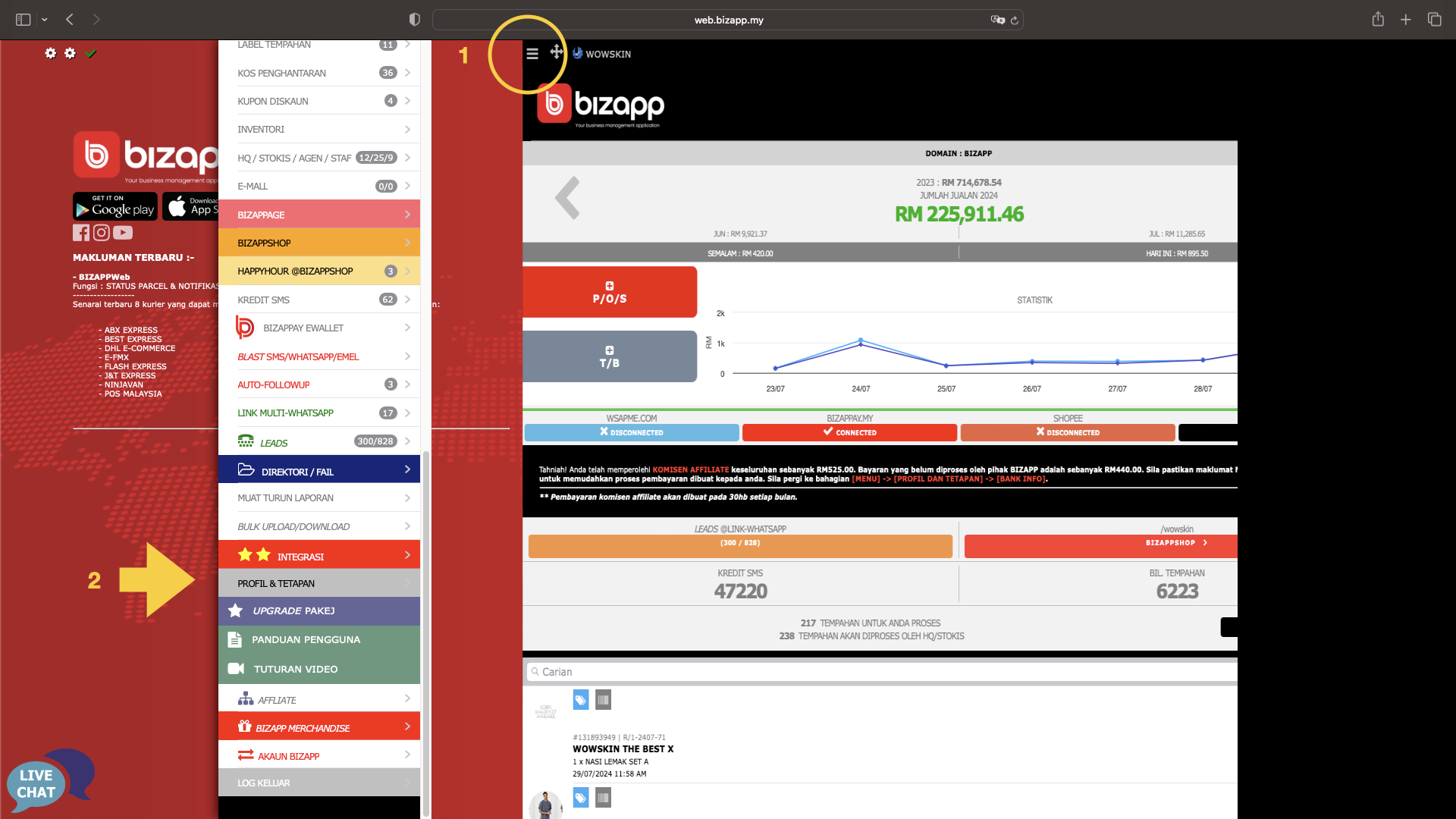
1. Tekan butang Menu
2. Tekan Menu Profil & Tetapan
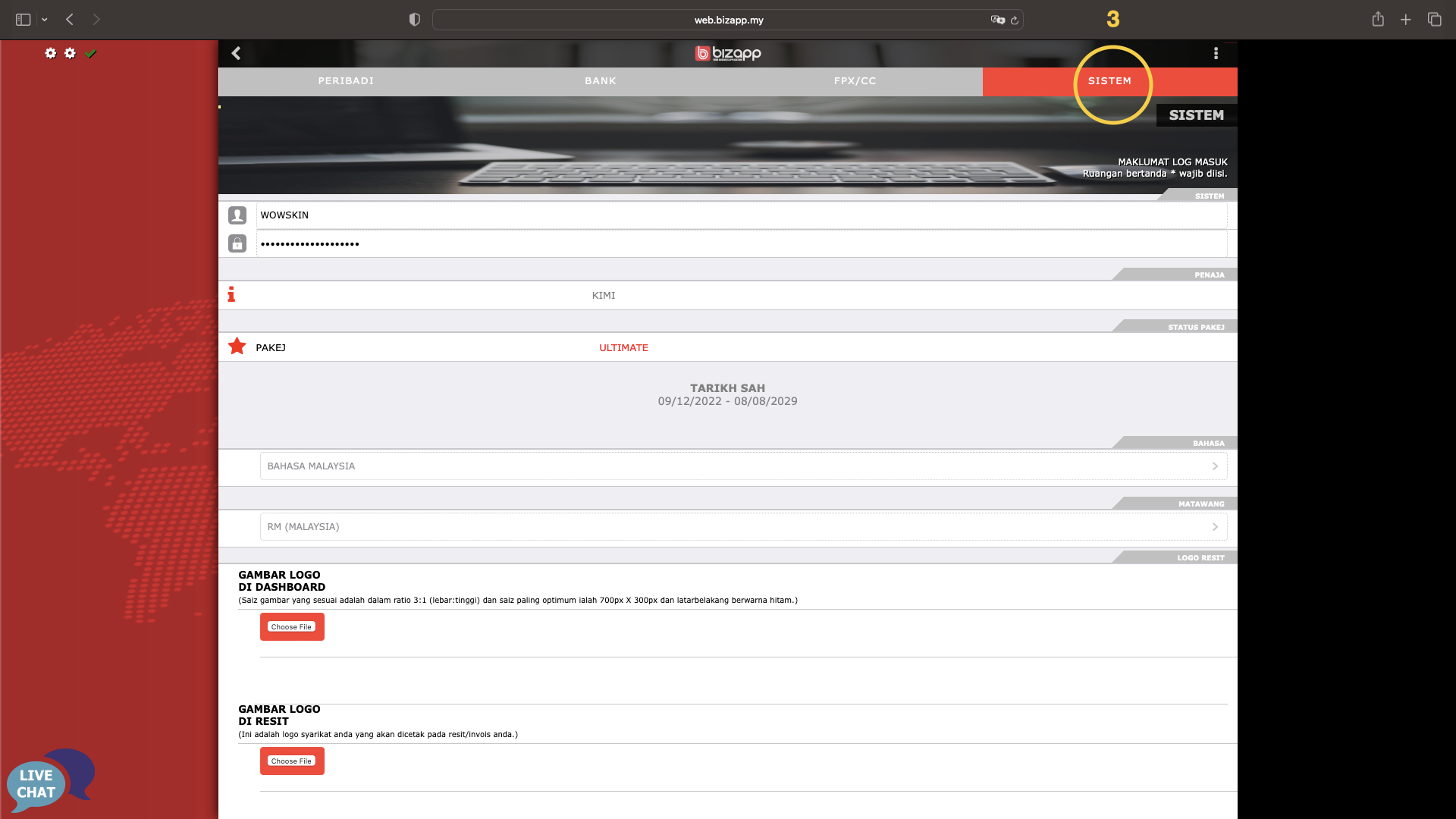
3. Tekan bahagian Sistem

<div><figure><img src="https://741636016-files.gitbook.io/~/files/v0/b/gitbook-x-prod.appspot.com/o/spaces%2FDDhNdk6F3s0N9Gq7wytI%2Fuploads%2FLhCX1dq3y8rZLjamLqGq%2FIntegrasi_ABX.003.png?alt=media&amp;token=de0d1ea1-5b78-4ef8-8b73-a8b68f36d688" alt=""><figcaption></figcaption></figure> <figure><img src="https://741636016-files.gitbook.io/~/files/v0/b/gitbook-x-prod.appspot.com/o/spaces%2FDDhNdk6F3s0N9Gq7wytI%2Fuploads%2FA9wyXbVSy8YV8inNkg3F%2FIntegrasi_ABX.004.png?alt=media&amp;token=0a944b3d-0c8d-4d75-8544-5058230694ef" alt=""><figcaption></figcaption></figure></div>

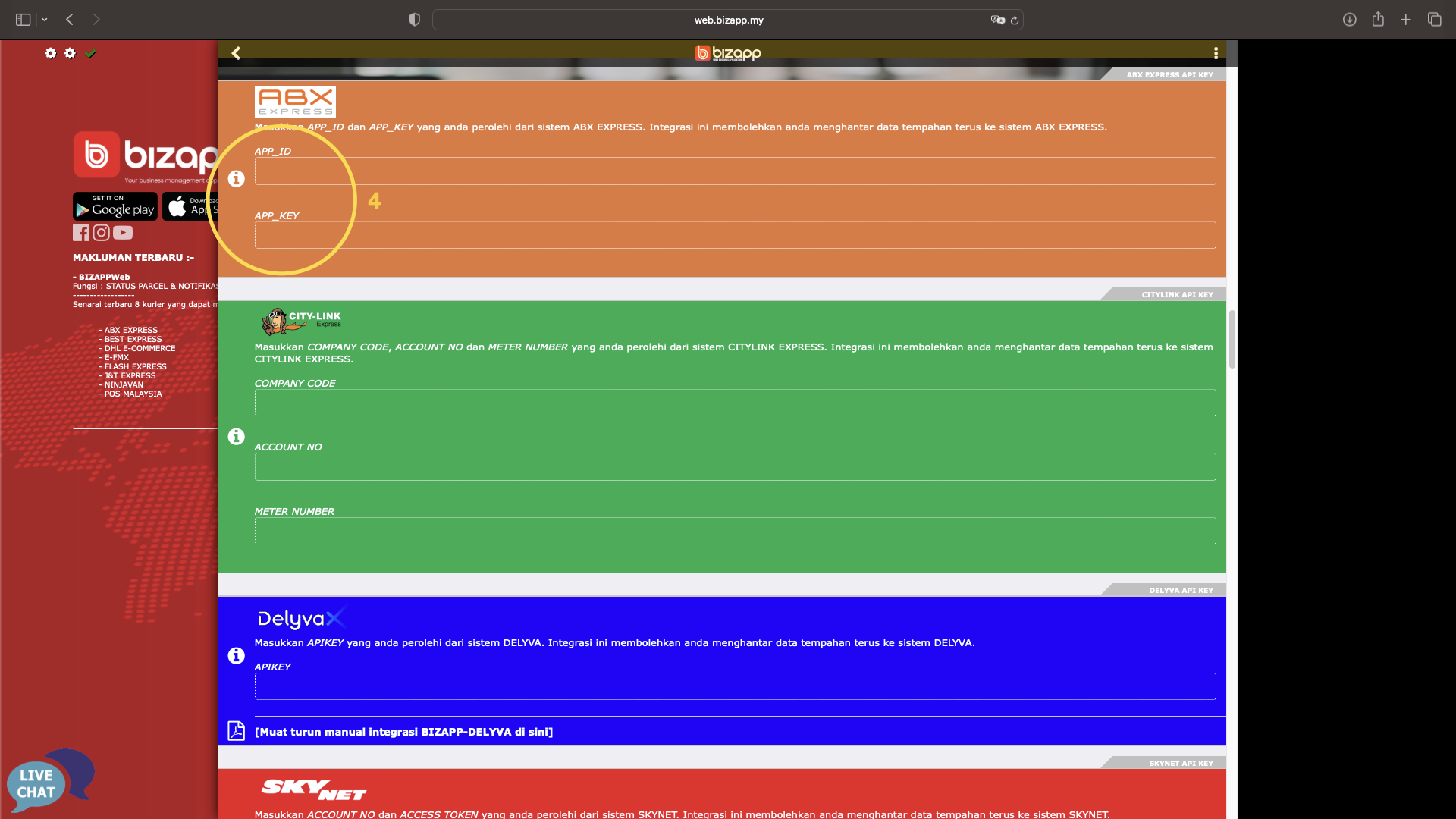
4. Skrol ke bahagian ABX dan masukkan maklumat di bahagian berkenaan
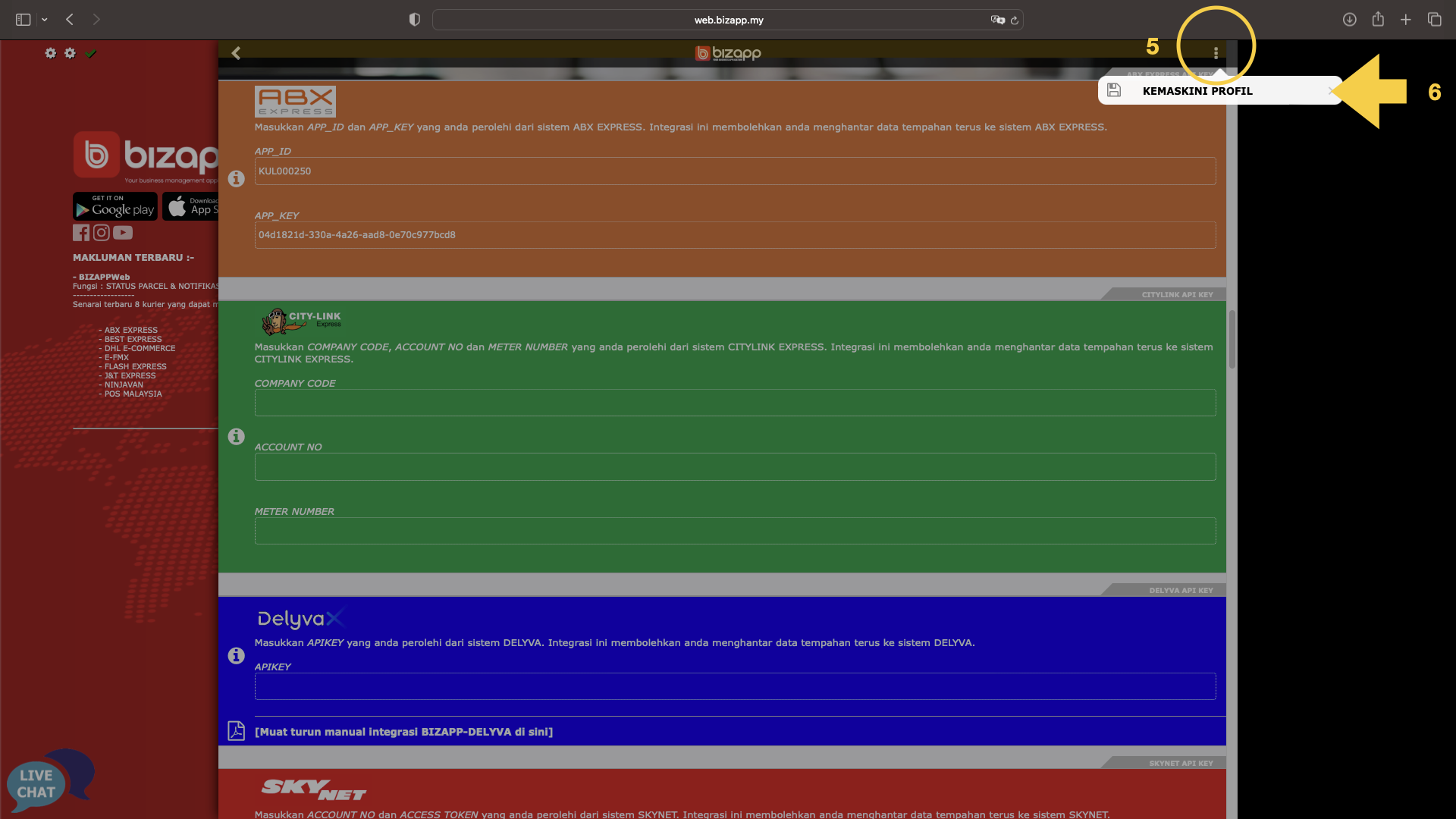
5. Tekan butang tiga titik atas kanan Menu
6. Tekan Menu Kemaskini Profil

<figure><img src="https://741636016-files.gitbook.io/~/files/v0/b/gitbook-x-prod.appspot.com/o/spaces%2FDDhNdk6F3s0N9Gq7wytI%2Fuploads%2F4PrYZBOH1CraU8vC5mr2%2FIntegrasi_ABX.005.png?alt=media&amp;token=adb81be5-b09b-4f84-8bf2-c598841deca2" alt=""><figcaption></figcaption></figure>

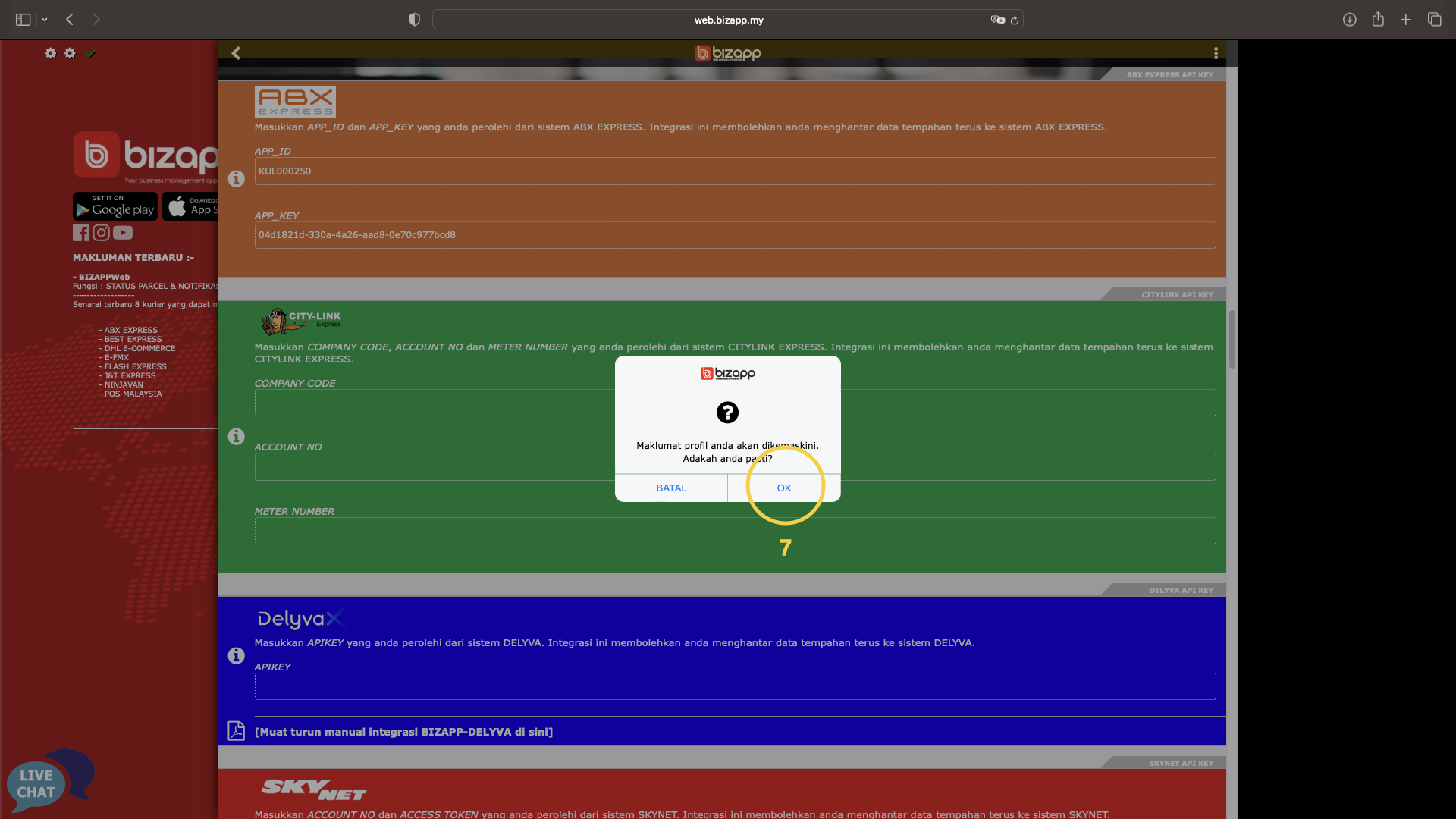
7. Tekan butang OK

Untuk push order satu tempahan kepada ABX/KEX, tekan [sini](/tutorial/selamat-datang-hq-founder/modul-kurier/push-order-ke-kurier/push-order-1-per-1/push-1-order-ke-abx.md).

Untuk push order banyak tempahan kepada ABX/KEX, tekan [sini](/tutorial/selamat-datang-hq-founder/modul-kurier/push-order-ke-kurier/push-order-bulk/push-bulk-ke-abx.md).